Learn how to use Mobbin in your workflow—the world’s largest source of real-world mobile design inspiration.
As designers, we constantly seek inspiration to renew our enthusiasm for new projects and explore best-in-class examples of features, UI elements, and flows. Mobile app design presents distinctive challenges because iOS and Android offer limited space and rely on increasingly standardized design patterns.
This article demonstrates how Mobbin can improve your design process through comprehensive research into real mobile applications. Mobbin is the largest source of mobile app design inspiration, containing more than 300,000 screenshots from 1,069 iOS, Android, and web applications.
Explore how mobile design inspiration can be incorporated into your workflow through the following topics and categories:
-
Ethical design considerations
-
Accessibility considerations
-
Psychological impact
-
Competitive analysis
-
Mood boards and design-language development
-
UI/UX best practices
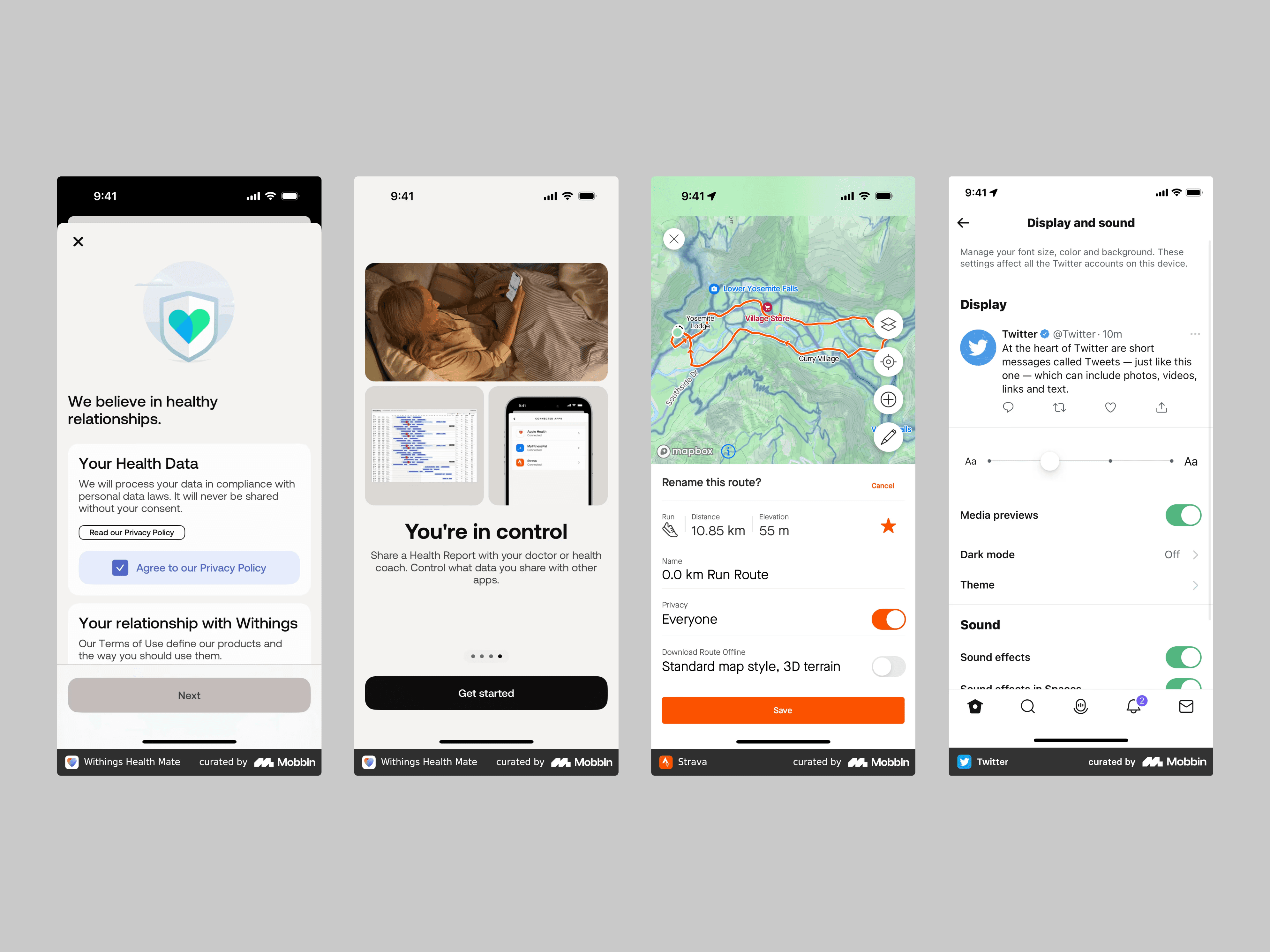
This image shows mobile app designs that prioritize transparency in data sharing, user privacy, and accessible font-size and dark-mode settings. The Withings app demonstrates transparent use of health data and options for sharing it with healthcare providers or coaches. Strava shows how privacy settings can be made clear and easy to use, while Twitter highlights font-size and dark-mode options for users.
Ethical Design Considerations
Ethical mobile-app design includes protecting user privacy, avoiding dark patterns, ensuring inclusion, and promoting sustainability. Researching mobile design inspiration can reveal strong examples of these practices.
Privacy
Privacy is a major concern for many people. Privacy-focused applications are becoming more popular because they are transparent about data use and give users control over their information. By studying these applications, designers can learn how to build trust by helping users feel safe and respected.
Dark Patterns
Dark patterns are deceptive design strategies that manipulate users into unintended actions, such as making an accidental purchase or sharing more information than expected. By identifying applications that avoid these tactics, we can better understand the importance of ethical design decisions that respect user choice and create a healthier digital environment.
Inclusive Design
When developing digital products, designers must consider the needs of every user, including people with disabilities. Applications centered on inclusive design often provide practical features such as text-to-speech, adjustable font sizes, and high-contrast color schemes. These choices help everyone enjoy a smooth and pleasant experience regardless of ability.
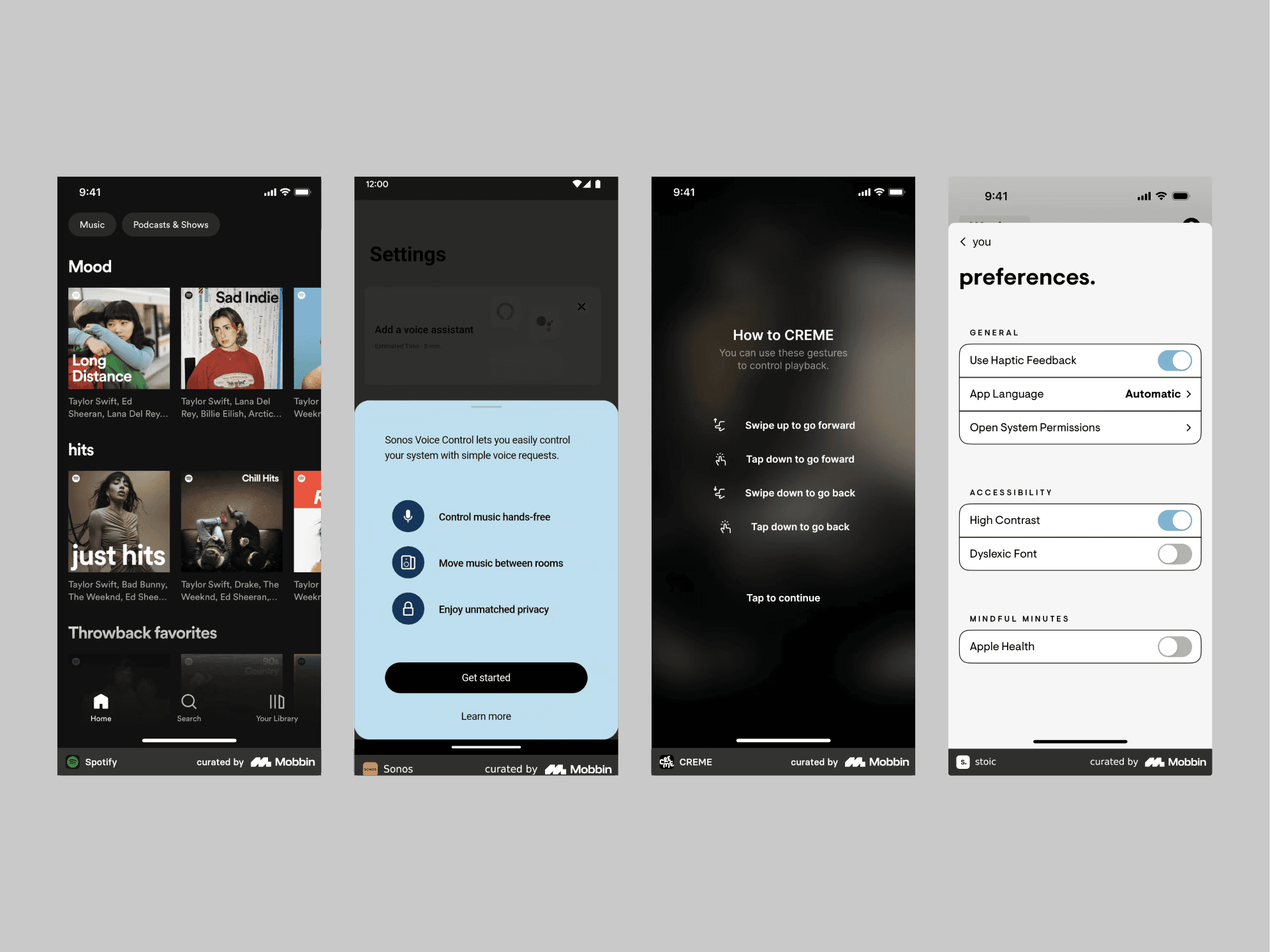
This image shows mobile applications built around accessibility, highlighting key features such as high-contrast settings, voice control, and customizable gestures. Spotify demonstrates a high-contrast interface, while Sonos emphasizes voice commands. Creme showcases varied gesture capabilities, and Stoic presents controls for high-contrast typography and dyslexia-friendly fonts.
Accessibility Considerations
Accessibility features are essential to inclusive mobile-app design. They include voice control, color-contrast and font adjustments, gesture customization, and screen-reader optimization. Integrating them is not merely a way to improve the user experience; it is necessary for closing the gap between technology and its users.
Voice-Control Integration
Integrating voice commands into a mobile app can transform accessibility, especially while users are moving. Imagine operating an application hands-free while walking or cooking. Voice-enabled apps make life more convenient for everyone and are especially useful for people with limited mobility. By allowing speech-based interaction, they expand the experience beyond tapping and swiping and make the digital world more accessible.
Color Contrast and Typography
Mobile screens vary in size, and users view them under many lighting conditions. Applications with high-contrast color schemes and clear, legible typography are easier to use. These choices are particularly important for people with visual impairments and can transform a frustrating experience into a smooth one. By paying attention to detail, designers can create content that remains comfortable for every user, even on small screens and regardless of visual ability.
Gesture Customization
Customizable gestures can significantly improve mobile usability. Users can modify gestures according to physical needs or personal preferences, allowing an application to serve a wider audience. Flexibility is crucial in mobile design, and standardized solutions are not always sufficient. Adjusting swipe sensitivity or enabling alternative gestures for common actions can make applications more inclusive.
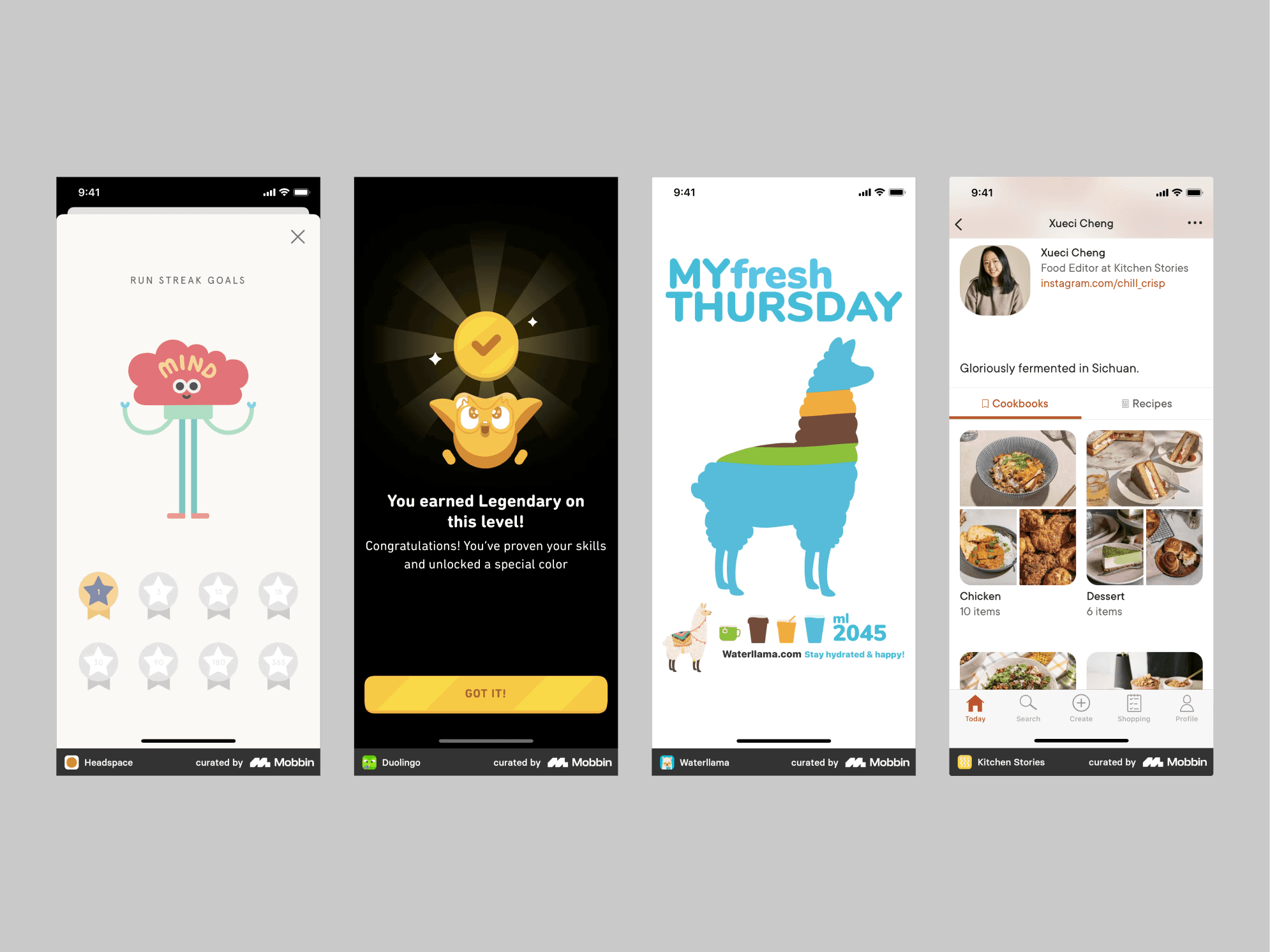
This image shows mobile app designs that strengthen motivation, encourage healthy habits, and simplify choices. Headspace rewards meditation streaks, Duolingo motivates users with badges, Waterllama makes hydration enjoyable through cheerful reminders, and Kitchen Stories uses well-organized recipes to make decisions easier.
Psychological Impact
Mobile-app design can have a profound effect on users’ psychology. Applications use techniques such as positive reinforcement to encourage healthy habits and reduce decision fatigue. Through progress tracking, simplified decisions, and encouraging feedback, mobile products can influence behavior, improve well-being, and increase overall satisfaction.
Positive Reinforcement
Mobile applications that use positive-reinforcement techniques such as badges and progress trackers can motivate users by acknowledging achievement. This approach is especially effective on mobile devices, where rapid and engaging interactions matter. Celebrating milestones can increase satisfaction, encourage healthy habits, and strengthen loyalty.
Reducing Decision Fatigue
Applications reduce decision fatigue by offering curated options and clear navigation. A meal-planning app, for example, can recommend recipes based on dietary preferences, helping users decide quickly and easily. This streamlined experience respects users’ time, lowers cognitive load, and makes the application easier to use.
Encouraging Healthy Habits
Applications designed to support physical and mental well-being encourage healthier behavior through thoughtful design. By tracking progress and providing feedback, they help users achieve personal goals such as regular exercise or mindfulness practice. Motivational design elements are essential to creating a positive and enjoyable health journey.
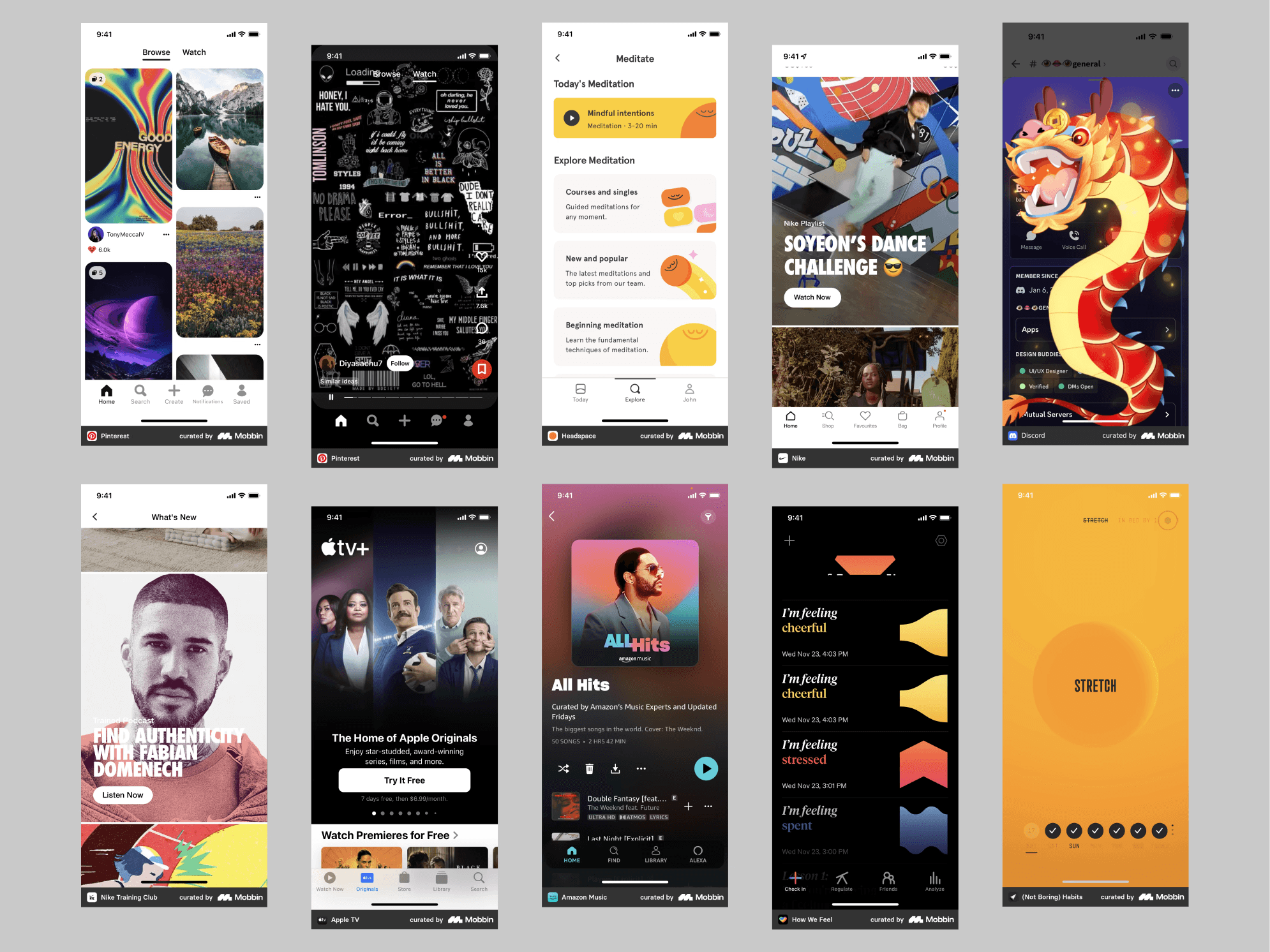
Explore Mobbin and you will discover a vast collection of visual references for building mood boards or design themes. It exposes you to a wider range of distinctive applications without requiring you to download each one to inspect its screens. Highlights in this collection include Nike Training Club, How We Feel, and (Not Boring) Habits.
Mood Boards and Design-Language Development
Exploring mood boards and creating a design language are important stages of mobile-app design. Collecting visual themes, analyzing color and typography, and studying icons and imagery across different applications all provide valuable inspiration.
Visual Themes
Creating a mood board from visual themes found across many applications is an excellent way to find inspiration. By collecting and analyzing mobile designs, you can inspire yourself and your team and use the examples to define an atmosphere or visual direction appropriate for the project instead of beginning from nothing.
Color Schemes and Typography
Studying color schemes and typography across mobile applications provides valuable insight for building a coherent design language. Because mobile screens are small, combinations that strengthen readability and engagement are especially important. Effective use of color and type improves visual appeal while ensuring that the application remains user-friendly and accessible.
Icons and Imagery
Mobile design references are an excellent way to explore icon and imagery styles that align with an application’s brand and objectives. During exploration, designers can study how to establish the right tone and create a memorable experience. Examining how successful applications use visual elements to communicate with users provides valuable insight into effective visual storytelling.
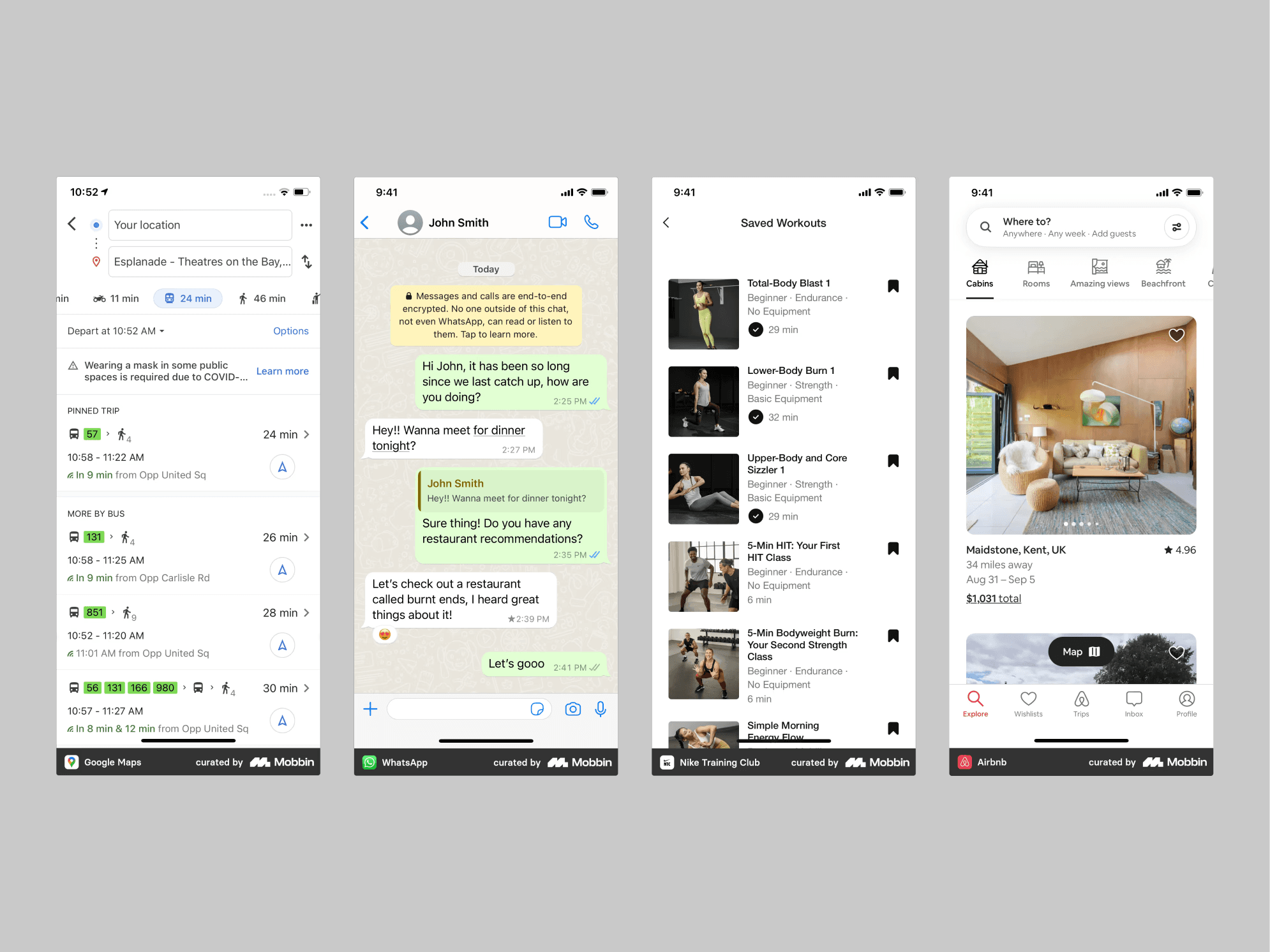
Discovering industry-leading applications on Mobbin is an effective way to explore and evaluate design patterns tested by millions of users. Curated examples include Google Maps, WhatsApp, Nike Training Club, and Airbnb.
Competitive Analysis and Benchmarking
Competitive analysis is highly useful when designing a mobile application. By studying successful products, designers can identify important design patterns and innovative features and understand how those applications distinguish themselves.
Industry Leaders
Observing the most successful applications across industries reveals recurring design patterns and innovative features. Identifying them helps designers understand why certain products stand out and how similar qualities can be incorporated into their own projects to improve engagement and satisfaction.
Feature Comparisons
Comparing features across applications provides deeper insight into user preferences and gaps in the market. This process helps uncover distinctive value propositions and ensures that your application offers functionality that is meaningfully different from—or better than—existing options.
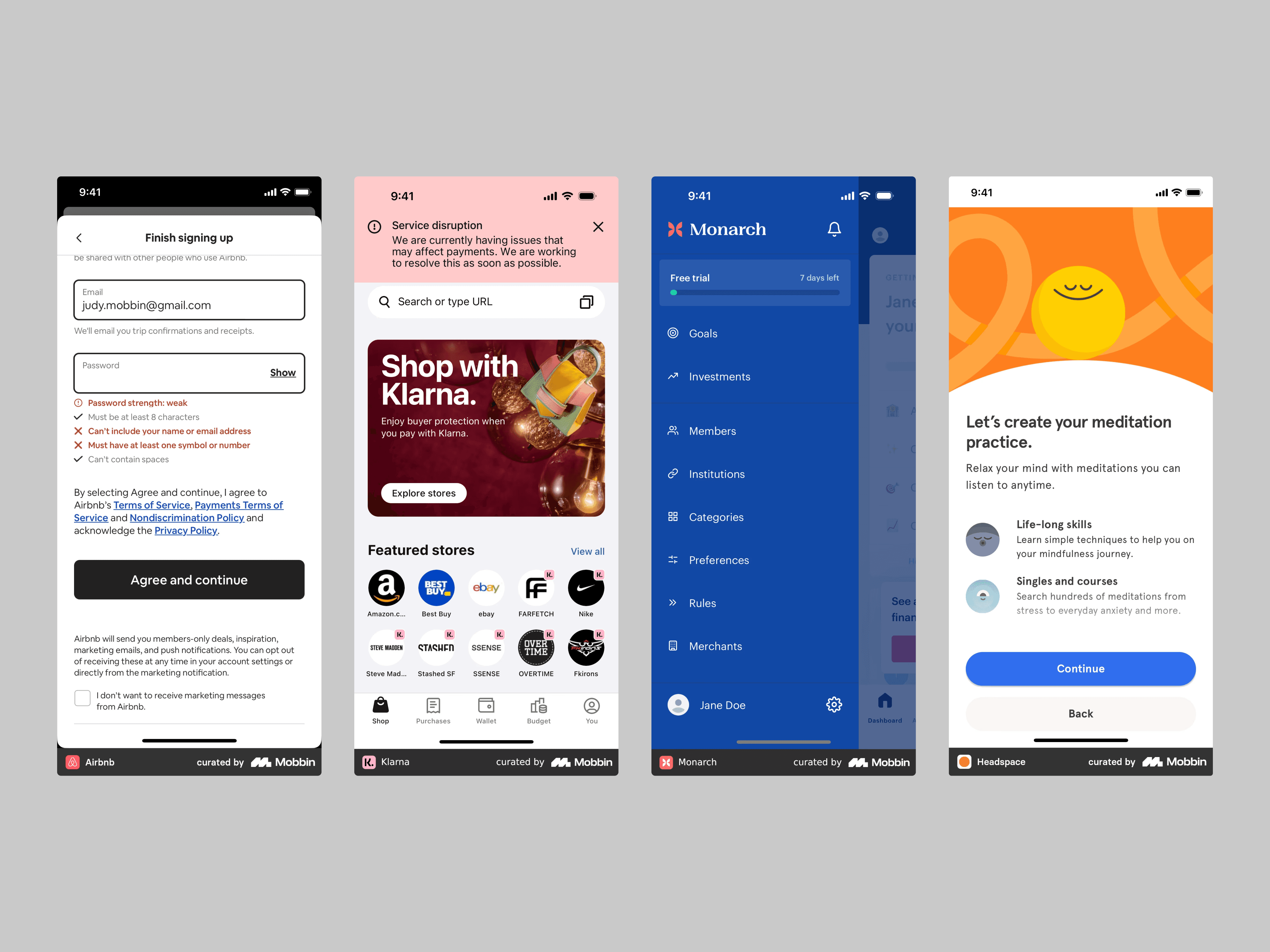
This image shows feedback and error handling in Airbnb’s registration form, clear service-interruption messaging in Klarna, effective navigation and free-trial progress in Monarch, and expectation setting in Headspace.
UI/UX Best Practices
Navigation Patterns
Effective mobile-app design depends on intuitive navigation that helps users find features and content easily. Strong applications use human-centered patterns such as bottom navigation positioned for the thumb or swipe gestures that mimic natural movement. Studying these patterns provides useful inspiration for navigation and interaction design.
Interactive Elements
Engagement is essential to maintaining user interest, and interactive elements are an effective way to create it. These may include touch-responsive animation and dynamic content that reacts to user input. Observing how leading mobile applications incorporate interaction can inspire more engaging and memorable experiences for your own users.
Feedback and Error Handling
Communicating feedback and errors effectively is essential in product design. A well-designed application should use clear messages and visual cues to explain the result of an action, whether it succeeds or fails. This communication reduces frustration and helps maintain trust. Studying how other mobile applications present feedback and errors can inspire improvements in your own product.
Simplicity and Minimalism
Simplicity is a fundamental principle of mobile-app design because it improves the experience by removing unnecessary elements. A minimalist approach focused on essential features and content helps achieve that simplicity. Minimalist strategies streamline interfaces, prioritize content, and emphasize key functionality. Reviewing minimalist applications can inspire you to simplify your own design and make it more usable and user-friendly.