
When designing a prototype, one common problem is:
The design looks “fake” rather than like a real product.
In product-design projects at 58UI Design Studio, we often need to solve this problem, especially for:
-
Data-intensive products
-
Admin systems and dashboards
-
SaaS product prototypes
-
Solutions that need to demonstrate realistic data states
In these situations, pulling API data directly into Figma layers is a highly efficient and professional solution.
Why Should Designers Use Real Data in Figma?
If you have encountered any of the following situations, this technique may be particularly useful:
-
A design uses placeholder data and reviewers respond that real conditions do not look like that.
-
Lists or cards must be rearranged completely whenever the data changes.
-
Designers and developers understand the data structure differently.
-
You want to validate information density quickly.
👉 Real data enables design decisions that more closely reflect actual usage.
Use a Plugin: Pull API Data into Figma with Data Sync
This method is based on the Figma plugin Data Sync, which can:
-
Request API data in JSON, XML, or CSV format
-
Retrieve data from Google Sheets
-
Write returned data directly into Figma layers
Step 1: Select the Text Layer That Will Contain the Data
In Figma:
-
Select the text layer
-
that should display dynamic data, then run the Data Sync plugin.
Step 2: Request an Open API
To demonstrate the principle, you can use an open API that requires no authentication.
For example, the article uses:
👉 An API that returns the current IP address
https://api.ipify.org/?format=jsonPaste the API address into the plugin’s input field and click Load.
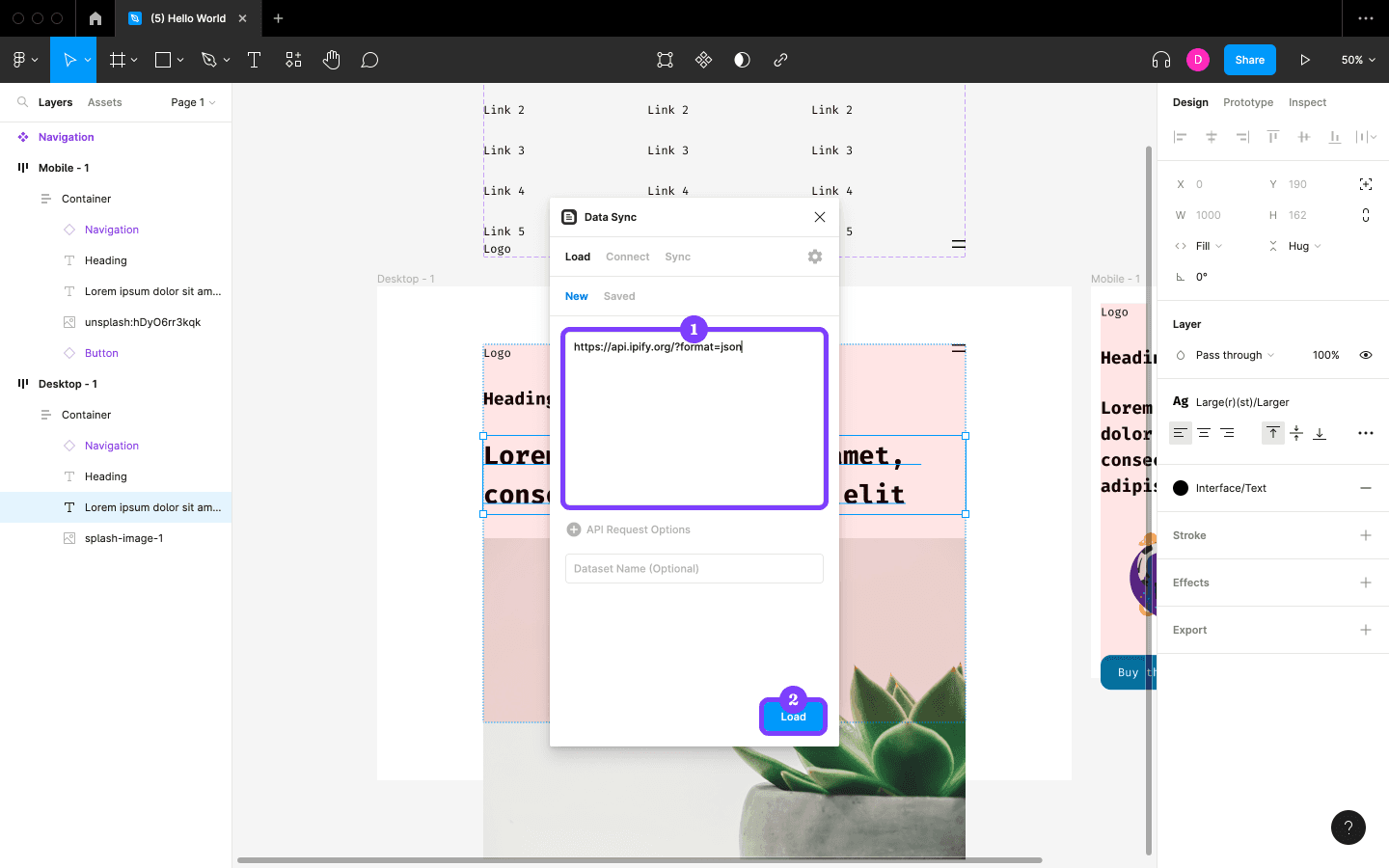
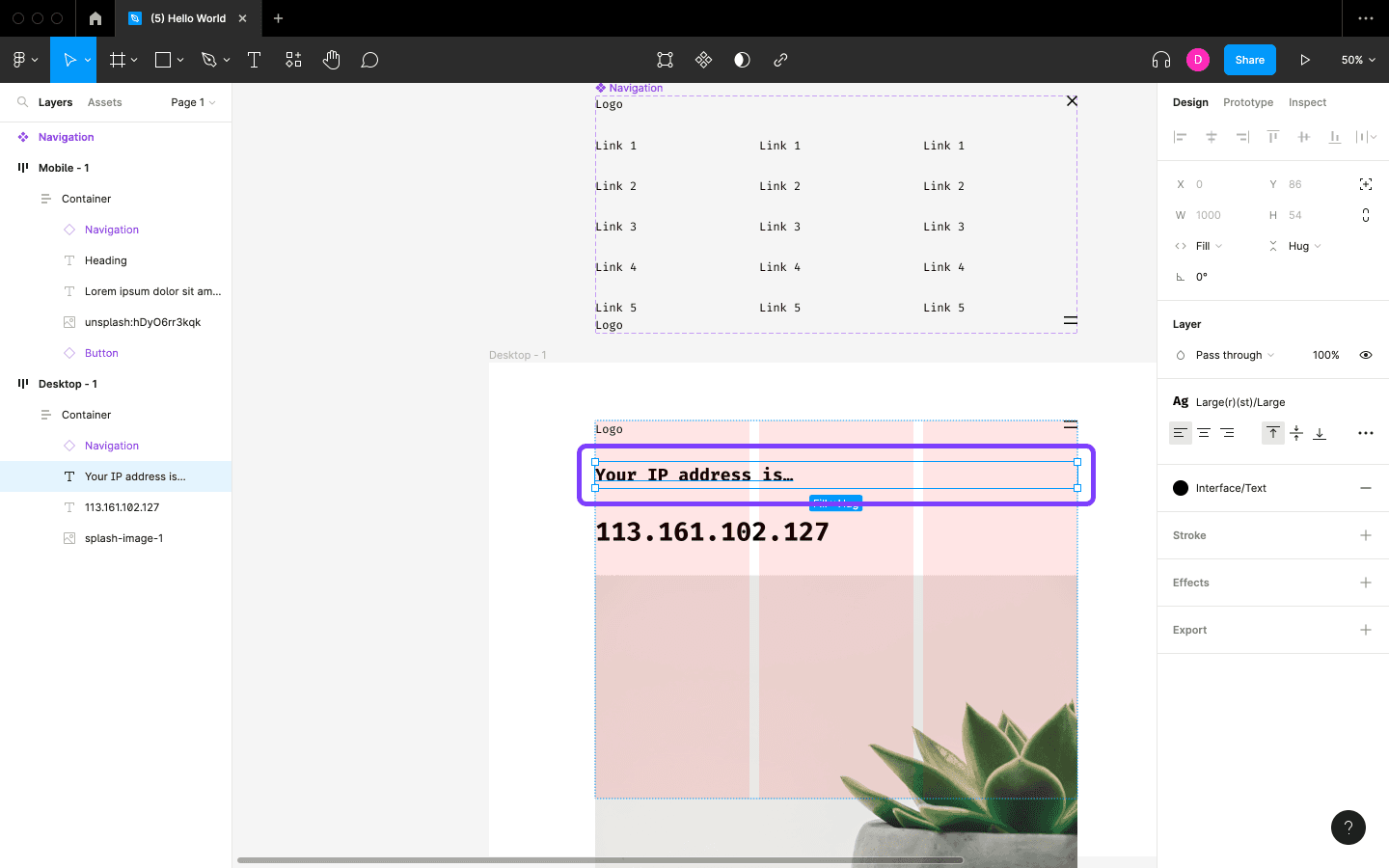
The plugin immediately returns the API data.
Step 3: Insert the API Response into a Layer
-
In Data Sync, click the returned data field.
-
Click Insert.
-
The original text is replaced with the API value.
After this step, your design is no longer using placeholder data.
Step 4: Refine the Copy Structure—This Is Critical
In real projects, data is usually only a variable.
What truly affects the experience is whether the copy structure is clear.
For example:
-
Original text:
123.45.67.89 -
Improved version:
Your IP address is…123.45.67.89
What If the API Requires Authentication?
In real projects, most APIs require:
-
A token
-
Headers
-
Parameter configuration
This usually creates two challenges:
-
The API response structure may be complex.
-
The data may require additional processing.
There are generally two solutions:
-
Configure request parameters within the plugin.
-
Use JavaScript to process the returned data.
If you are a designer, even a basic understanding of JavaScript can significantly increase your control when working on data-driven products.
Which Design Scenarios Benefit from This Technique?
At 58UI Design Studio, we commonly use this approach for:
-
Products with dense lists or tables
-
Financial and data-management platforms
-
SaaS administration systems
-
Products in which the data itself forms the interface
Its greatest value is not technical showmanship, but the ability to
make design decisions that reflect the real product state more closely.
Common Question: Do Designers Really Need to Understand APIs?
You do not need the same depth of knowledge as a developer, but you should at least:
-
Know what an API is.
-
Understand what a data structure looks like.
-
Recognize that design and data are tightly coupled.
This knowledge makes communication with product managers and developers noticeably more professional and gives you a stronger voice.
Conclusion: A Low-Cost, High-Return Design Technique
Pulling API data into Figma:
-
Will not turn you into an engineer,
-
but it can make you a designer who understands products more deeply.
In today’s design environment, where realism and efficiency are increasingly important,
the ability to design with data is becoming a dividing line between average and excellent designers.
If you work on product-oriented or system-oriented projects, this technique is well worth incorporating into your long-term workflow.